AI auto-blur and pixelate
Drop in a photo and RedactPix auto-detects every face to blur or pixelate. An optional local AI scan finds sensitive text like emails, phone numbers and IDs — hide them all with one click.
Blur faces, pixelate photos, and remove text from images without uploading a single byte. RedactPix runs on-device AI to find private information — emails, phone numbers, IDs, faces — so you can redact them in one click. Free, no account.
Drop image here or paste a screenshot
JPG · PNG · WEBP — up to 20 MB · No upload, no account
Drop in a photo and RedactPix auto-detects every face to blur or pixelate. An optional local AI scan finds sensitive text like emails, phone numbers and IDs — hide them all with one click.
Unlike online editors that send your image to a server, RedactPix runs entirely on your device. Blur a photo, pixelate an image, or remove text — all without your files ever touching the cloud.
Pick a file, redact, download. No install, no account, no watermark. Export a flattened PNG with metadata stripped — ready to share in seconds.
Drag the slider to compare an image before and after redaction. Faces, names, IDs and contact details — all hidden, all on your device.
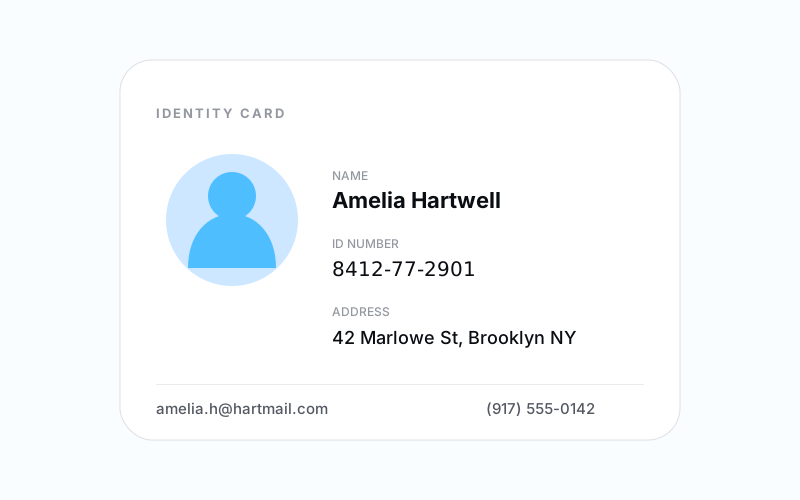
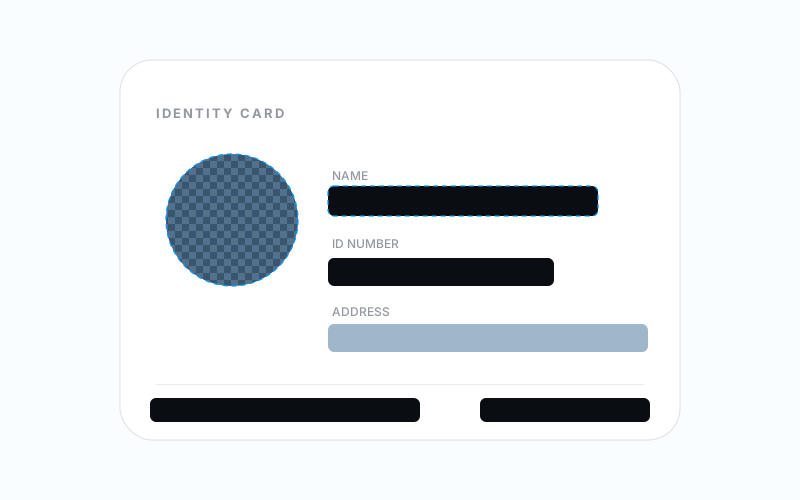 Before After
 Black out the details on an ID — or blur faces, mosaic photos, and scan for private text.
Every tool runs in your browser. No upload, no account, no watermark.
Four steps from raw image to a safely redacted, flattened file.
Choose a JPG, PNG, or WEBP file, drag it in, or paste a screenshot straight from your clipboard.
Click Scan for Private Info to find sensitive text, private text and faces in one pass. Or drag on the image to draw a manual box over anything the scan missed.
Pick how each area is occluded. Every box can use a different method.
Export a single PNG with the redaction baked into the pixels — no layers, no editable objects.
Everything about how RedactPix keeps your images private.
From privacy compliance to casual sharing — RedactPix handles it all, locally.
Automatically detect and blur every face in a group photo, street shot, or school picture. On-device AI finds them — you choose blur, pixelate, or blackout.
Pixelate an image or screenshot to hide sensitive UI elements, usernames, or addresses. Adjustable block size from fine to chunky.
Remove text from an image with AI. The scanner finds emails, phone numbers, URLs, and ID numbers — blackout or blur each with a click.
Blur or pixelate license plates for GDPR compliance when sharing photos of cars, streets, or real estate publicly.
Scan a document for patient names, account numbers, and addresses. Black out each match securely — nothing is uploaded, so it's safe for HIPAA-sensitive material.
Auto-detect and blur faces of children in classroom, daycare, or community photos before sharing. Because nothing is uploaded, it's safe for minors.
RedactPix is a free image redaction tool that runs entirely in your browser. Whether you need to blur an image, pixelate a photo, or remove text from a screenshot, RedactPix handles it without uploading your files. All processing — face detection, text scanning, blur, pixelation, and blackout — happens locally using on-device AI and the Canvas API.
Unlike cloud-based editors that send your image to a server, RedactPix never transmits your data. This makes it ideal for redacting sensitive information like medical records, financial documents, ID cards, and photos of children. There is no account to create, no app to install, and no watermark on the output. Open the page, upload an image, redact, and download a flattened PNG with metadata stripped.
Common use cases include blurring faces in photos for GDPR compliance, blurring license plates in real estate photography, redacting emails and phone numbers from screenshots before sharing, and protecting patient data in telehealth screenshots. The tool works on desktop and mobile browsers — iOS Safari, Android Chrome, and all modern browsers.